Built by a fraud analyst

Check a payment before you send it.

Check for fraud signals before you pay — suspicious payment instructions, vendor mismatches, and email scams, flagged in seconds.

Works for: Wire transfers ACH payments Invoices Vendor payments

Takes 10 seconds. No setup required. Free to start.

paysentinelhq.com/app
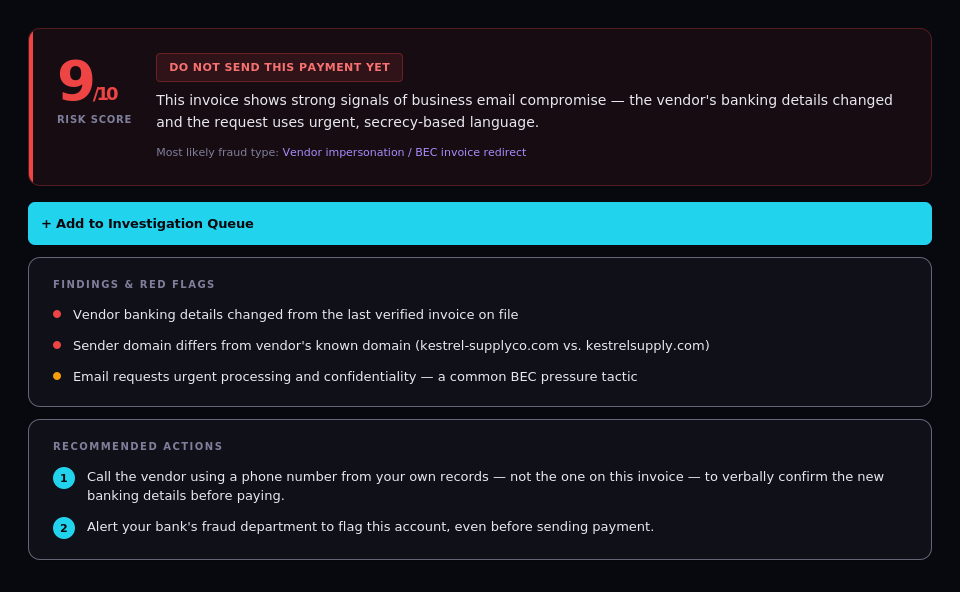
PaySentinel app showing a 10/10 high-risk BEC invoice fraud result with findings and red flags
A real result from PaySentinel — unedited Try it yourself →
$2.77B
Lost to payment fraud in 2024
$19,372
Average loss per incident
33%
Year over year increase
10s
To run a check
Source: FBI Internet Crime Complaint Center (IC3) 2024 Annual Report
The Problem

Most payment fraud happens right before you send it.

It doesn't look like fraud. It looks like a normal invoice or a routine email. By the time you realize — the money is gone.

Changed bank details A vendor emails "updated" payment instructions. The invoice looks identical — same logo, same amount — but the account number changed. You wire the money. It goes to a fraudster.
→ Wire transfers are nearly impossible to reverse
Fake vendor A new supplier contacts you with a great price. You pay the deposit. The vendor doesn't exist — it was created to collect your payment and disappear.
→ Money gone before any goods are delivered
Urgent wire request An email from your CEO: "Wire $8,500 immediately — closing a deal, keep confidential." The urgency overrides your instincts. You send it. The email was fake.
→ Funds gone within minutes, account overseas

Check before money leaves your business.

Before sending a wireWires are irreversible. Run a check before you hit send — every time.
When bank details changeA vendor says they changed banks. This is the #1 fraud signal. Always verify.
Paying a new vendorNo history, no trust established. Check before you commit to a first payment.
Suspicious emailSomething feels off — urgency, unusual request, strange sender. Check the email first.
Large invoicesAny payment over $1,000 is worth a 10-second check before it goes out.
Urgent payment requestsPressure to pay fast is a red flag. Slow down and check before acting.

From payment details to a clear next step.

01
Enter the details
Paste payment instructions, vendor info, invoice details, or a suspicious email. Upload a PDF invoice for automatic extraction.
02
We analyze instantly
Routing numbers are validated and checked against a live bank registry. Detection logic informed by real fraud investigation workflows checks bank detail changes, fake vendors, typosquat domains, and more.
03
Get a clear next step
Risk score, specific red flags, and exact next steps — written in plain English. Know whether to pay, verify, or stop.
Takes about 10 seconds. No account needed.
Want to know exactly what gets checked and how the risk score is built? See the full technical breakdown →
What We Detect

Fraud-review logic informed by real investigations.

Not generic AI — detection logic informed by real fraud investigation workflows, built by a specialist in payment fraud, account takeovers, and phishing.

Phantom vendors
Fake companies created solely to collect payments — no web presence, P.O. box only, Gmail addresses, suspiciously low invoice numbers.
Email impersonation
Character-by-character domain analysis catches mlcr0soft.com vs microsoft.com. CEO fraud and urgency tactics flagged.
Vendor memory
Remembers routing numbers from past checks. Bank detail changes between invoices trigger an immediate alert.
Phishing links
Detects credential harvesting sites, cloned login pages, and lookalike domains designed to steal access.
Invoice manipulation
PDF upload extracts fields automatically — round amounts, mismatched addresses, changed payment details.
Inside PaySentinel

Every check builds a case file, not just a score.

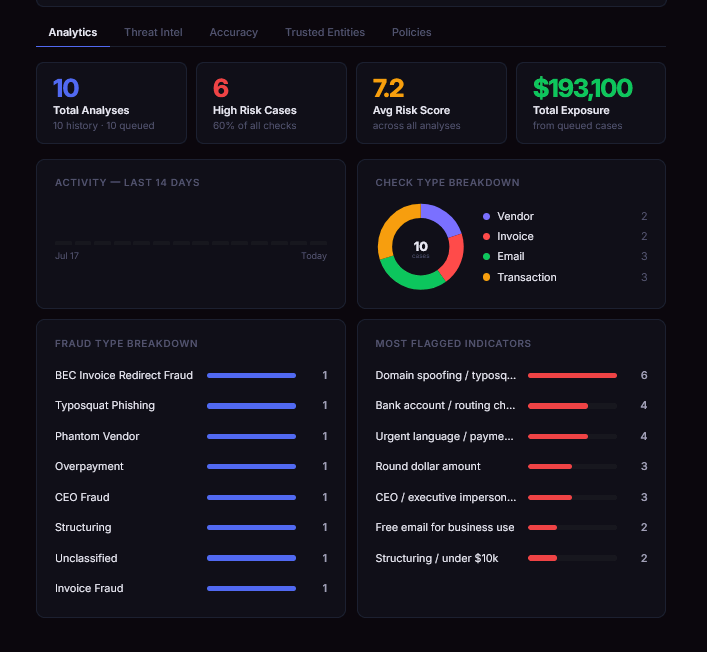
Real screens from the actual app — patterns across cases, vendor and domain history, open investigations, and how often the calls have been right. Everything shown below is free to use today.

PaySentinel Analytics tab showing total analyses, high risk cases, fraud type breakdown, and most flagged indicators

Patterns across every case

Fraud type breakdown, flagged indicators, and check activity — not just one result in isolation.

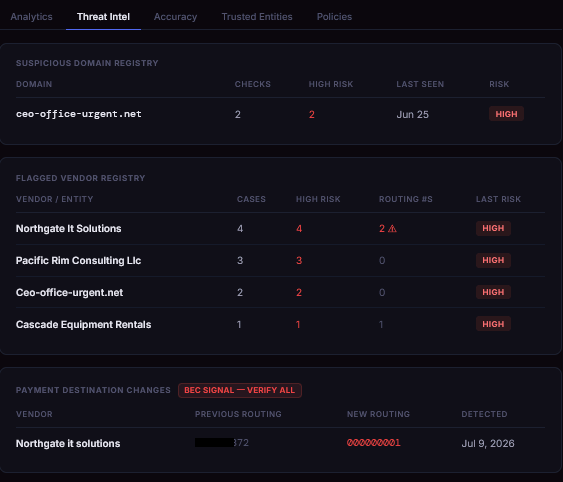
PaySentinel Threat Intel tab showing suspicious domain registry, flagged vendor registry, and payment destination changes

Vendor and domain history

Once a domain or vendor is flagged, PaySentinel remembers — and tracks every routing change after.

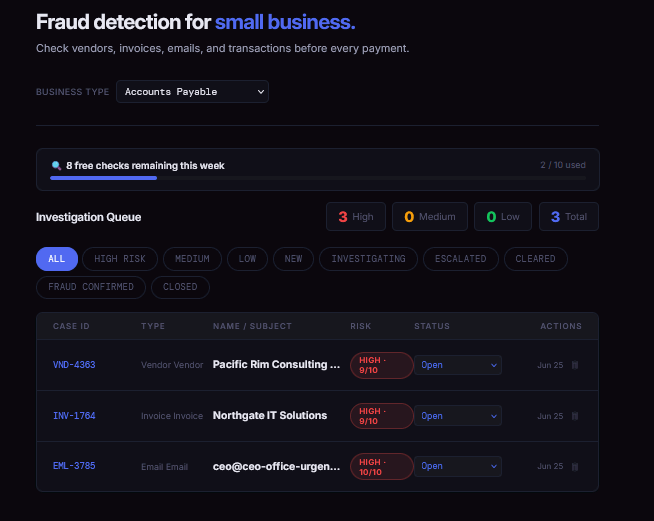
PaySentinel Investigation Queue showing open cases by risk level

Track open cases

Every flagged check, in one queue, until it's resolved.

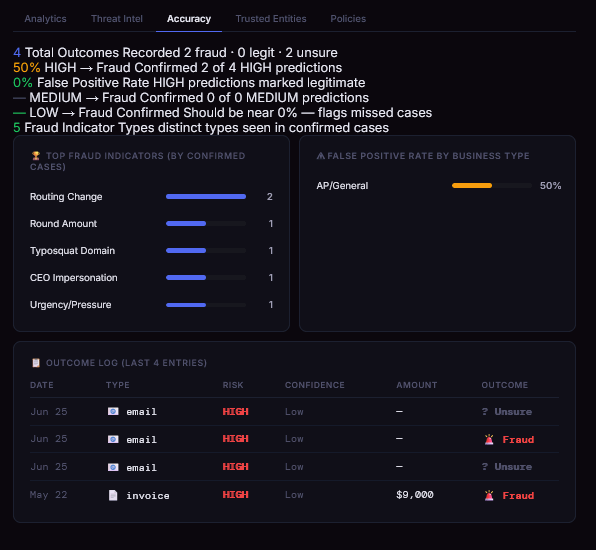
PaySentinel Accuracy tab showing outcome tracking and false positive rate

See how often it's right

Confirmed outcomes tracked against every prediction — including false positives.

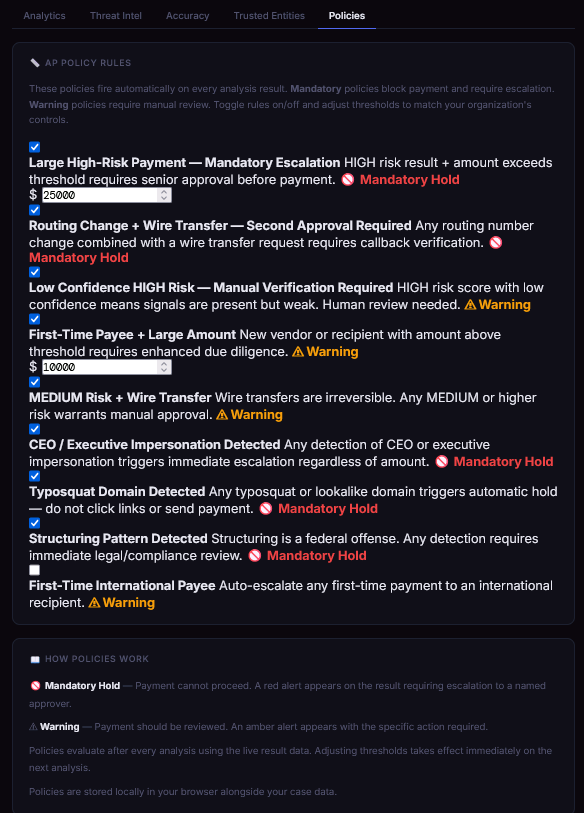
PaySentinel Policies tab showing configurable mandatory hold and warning rules

Set automatic holds

Rules like "routing change + wire transfer" can require approval before payment, automatically.

What PaySentinel doesn't do
We believe in being upfront. PaySentinel works best as a final check before sending money — not as a replacement for good payment controls.
"As a fraud analyst focused on payment fraud, account takeovers, and phishing, I see these patterns every day. Small businesses face the same threats — but without any of the tools. I built PaySentinel to change that."
Pricing

Simple, honest pricing.

Start free — no credit card, no account. Upgrade when you need more.

Free
$0
forever
Good for occasional checks or trying it out.
  • 10 checks per week
  • All 4 check types (vendor, invoice, email, transaction)
  • PDF invoice upload & auto-extraction
  • Risk score + red flags + action steps
  • PDF report export
  • Session history only
Start for free
Team
$99
per month
For small accounting teams and growing businesses.
In development
  • Everything in Pro
  • Multiple users & shared workspace
  • Shared queue, audit logs & admin controls
  • Dedicated support
Join the waitlist →
Your history stays on your device
Case data, vendor memory, and investigation history is stored locally in your browser — never uploaded to our servers. Payment details you submit for analysis are sent to our secure analysis engine for processing. We do not store or retain your submission data after analysis is complete.
Free Guides

Learn the patterns before you need them.

Practical, investigator-written guides on spotting fraud before it costs you — free, no signup required.

Payment Fraud Prevention Hub
Start here — every category of payment fraud in one place, all 13 guides organized by threat type, plus an interactive pre-payment checklist.
Explore the hub →
G2
Used PaySentinel?

Leave a quick review — it genuinely helps a small, independent tool get found.

Review us on G2 →
Frequently asked questions
Is PaySentinel actually free?
Yes. The free tier gives you 10 checks per week, no account or credit card required — all four check types (vendor, invoice, email, transaction), full risk scoring, and PDF report export. There's no trial period or expiration; it's free for as long as you want to use it at that level.
Do I need to create an account?
No. You can go straight to the app and run a check with no signup. Case history will only persist for that session unless you're on a plan with persistent history enabled.
What's the difference between Free and Pro?
Free covers occasional checks well — 10 per week with full analysis on every check. Pro is built for people running checks regularly and adds persistent case history, vendor memory, a full investigation queue, and risk analytics. Some of these Pro features are available free during early access — they'll move behind the Pro plan once it officially launches.
Does PaySentinel replace calling my bank or vendor to verify a payment?
No — and we're upfront about that. PaySentinel is a final check before you send money, not a replacement for verbal verification on high-value payments or your existing payment controls. It analyzes what you give it; it doesn't monitor your accounts automatically or guarantee fraud detection.
Who built PaySentinel?
PaySentinel was built by Paul, a working fraud analyst specializing in payment fraud, account takeovers, and phishing. His last name is kept off, which is common in fraud investigation work, where visibly attaching a full identity to fraud-detection tools can itself create risk.
What happens to the data I submit?
See our Privacy Policy for the full details on what's collected and how it's handled.

Catch the warning signs before they cost you.

About to send a wire or pay an invoice? Run it through PaySentinel first. Takes 10 seconds. Could save thousands.

Try It Free — No Card Needed → See Pricing
Free to start. No account required. No setup.